LocumView Catalyst
Turn domain expertise into engineering skill.
The purpose
Your experience is the starting point.
You know the workflow, the constraints, and the problems worth solving. Catalyst aims to help you turn that understanding into practical IT engineering and building skills, whether your domain is clinical care, research, science, or another field.
AI can explain a concept, help implement a feature, or review a change. The goal is your growing ability to reason about a design, debug a failure, write a useful test, and maintain what you build.
Catalyst belongs alongside LocumView’s RHEL and SUSE desktop offerings. It shares their commitment to open engineering, reproducibility, and human control, with its own development and learning purpose.
Build with understanding
Work from a real project: inspect the requirements, write code, run tests, investigate failures, and review the diff. Engineering Mode is the default workflow.
Develop independence
The Learning Mode design adds guided practice, explanations, feedback, and private progress. Move toward explaining and solving a problem yourself, at a pace that fits your work.
Contribute what you know
Contributions can be code, a reproducible bug report, documentation, a tested exercise, or domain requirements. Deep experience in a field is a useful starting contribution.
Inside the prototype
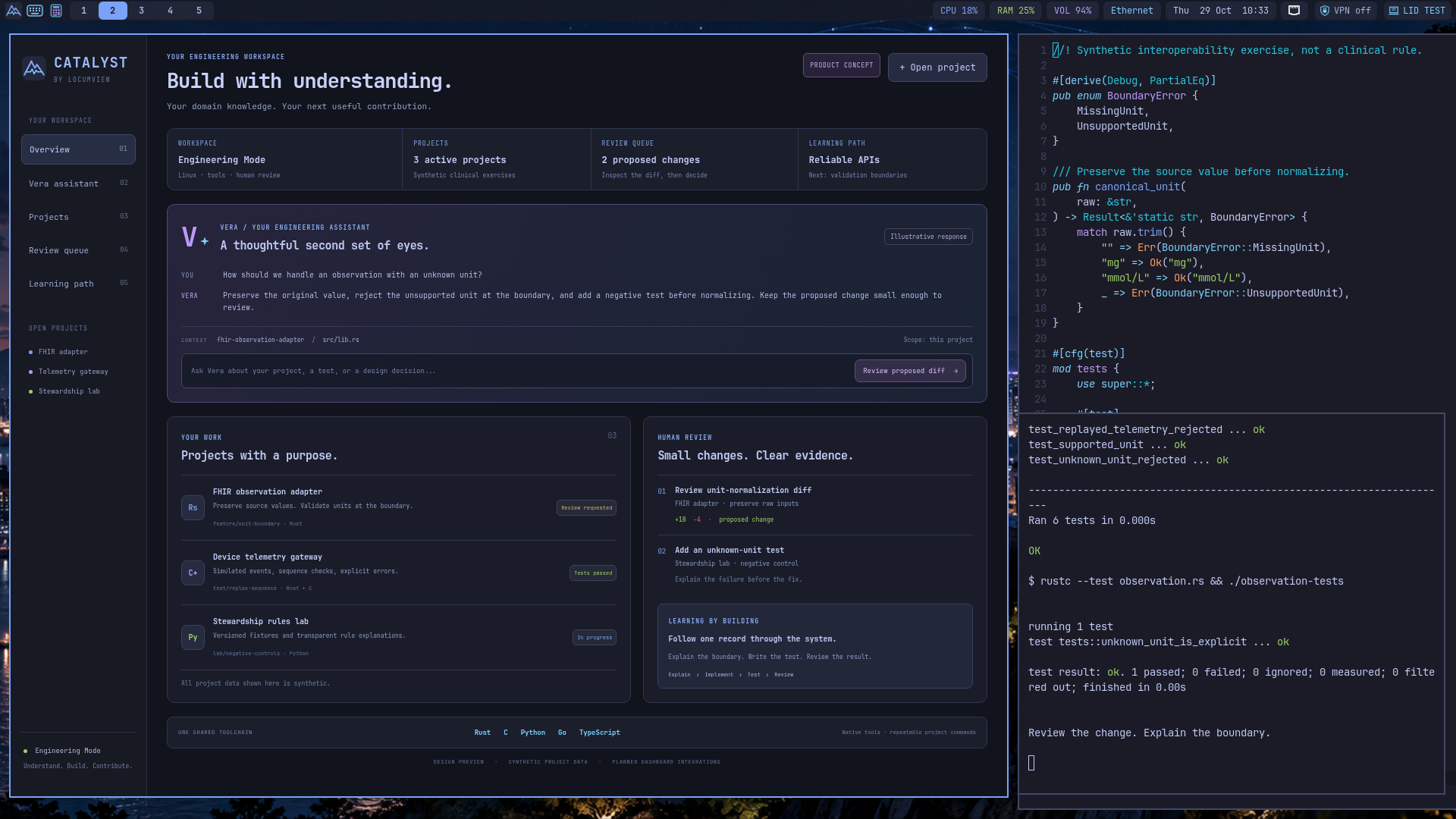
The workspace vision, and the tools behind it.
Learn by building
From the terminal to a system you can explain.
Find your footing
Linux, the terminal, Git, files, processes, and a repeatable project setup.
Build something small
Programming, data modeling, APIs, and interfaces with Rust, C, Python, Go, or TypeScript.
Make it dependable
Meaningful tests, debugging, error handling, secure defaults, and reviewable changes.
Understand the whole system
Containers, networking, automation, cloud-native infrastructure, and observability.
Share a useful contribution
Explain the problem, propose a small change, provide evidence, and learn from review.
A lightweight Linux workspace with room to grow.
The current implementation uses Alpine Linux, OpenRC, Sway, Fish, Git, LazyVim, VSCodium, and rootless containers. It is designed for development in any language: add the toolchain your project needs through native packages or a suitable project runtime. Rust, C, Python, Go, and TypeScript are the current shared starting stack, with validation recorded for specific workflows.
Clinical examples use synthetic data and simulated devices. An engineering environment does not establish clinical validity, and the RHEL desktop’s security evidence does not automatically apply to Catalyst.
Why Alpine
A small, explicit base for a focused workspace.
Start with a small base
Alpine builds around musl libc and BusyBox, with split packages that let us add the components a project needs. The aim is a focused system and measured resource use, especially on modest hardware and VDI guests.
Keep the system inspectable
The apk package manager and OpenRC service model fit an explicit, code-defined workstation. They give learners and maintainers a practical way to understand packages, services, configuration, and recovery.
Build fluency with containers
Practice packaging services, choosing dependencies, setting resource limits, and measuring a workload. The planned learning projects connect those skills to device gateways and simulated telemetry, with attention to memory, CPU, storage, and response time.
Make room for project choices
Native tools cover the core stack; project containers and supported application runtimes provide other environments when needed. Alpine’s musl base has compatibility tradeoffs, so prebuilt binaries, language runtimes, extensions, and debuggers need their own checks.
C and Rust for embedded health technology.
C and Rust are core to Catalyst’s systems and embedded development direction. Planned projects cover device interfaces, telemetry, C interoperability, and resource-aware programming, giving domain experts a path from a simulated device to understanding its software and engineering constraints.
Alpine is the development and Linux learning environment. Firmware may target bare-metal hardware, an RTOS, or another Linux system; cross-compilation, debugging, and resource measurements must be verified for each target.
The Embedded Rust Book: embedded development and C interoperability (opens in a new tab)A small base supports deliberate engineering. Secure delivery still depends on configuration, updates, isolation, identity, testing, and operational review; Alpine’s size is not evidence that a clinical VDI deployment is secure.
Alpine Linux: small, simple, secure (opens in a new tab)The LocumView use case
A secure VDI development workspace for clinical technology.
Catalyst is designed for general-purpose development in any language. Within LocumView, its main use case is a secure virtual development workspace for building clinical technology: interoperability services, synthetic clinical workflows, device simulators, AI evaluation, and the infrastructure around them.
Domain experts and engineers should be able to work on a persistent, reviewable project environment through LocumView’s delivery model, with scoped access, explicit AI data permissions, and separation from clinical production systems.
That secure VDI experience is the intended deployment use case. The current Alpine prototype and native tools are being validated first; hosted transport, identity, storage, reconnect, isolation, and security controls each retain their own acceptance gates.
Build plan
Core product. Clear release gates.
Alpine VM desktop, native Rust/C workflow and managed LazyVim Rust language-server checks verified
Core LocumView product and open-source contribution project; public source release, unified Vera, persistent Learning Mode and hosted delivery remain Planned
- In progress
Reproducible engineering workstation
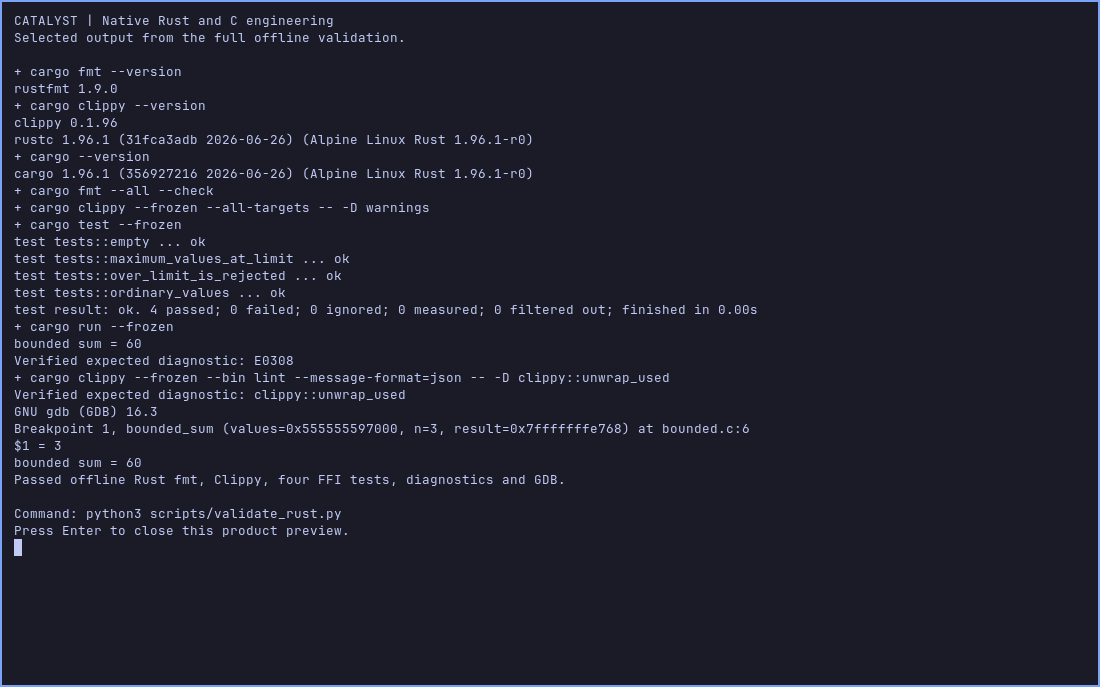
Alpine/OpenRC/Sway VM and native Rust fmt, Clippy, tests, C FFI, GDB and managed LazyVim LSP checks pass
Acceptance: Prove clean rebuild and recovery, both editors, rootless project workflows and the selected hardware; a working VM is not a released distribution
- Planned
Vera and AI-assisted engineering
Persona and backend contracts exist; clients are provisioned, but unified Vera and authenticated end-to-end tool use are unverified
Acceptance: Show actual provider, scoped project context, reviewable diffs, tests and safe failure without silent cloud escalation
- Planned
Optional persistent Learning Mode
Mode contract and private progress design only
Acceptance: Original practical exercises, including lightweight Linux/containers and C/Rust embedded projects with measured resource use; feedback, private progress across restarts and demonstrated independent explanation, debugging and testing
- Planned
Public source and contribution program
Open-source direction and Apache-2.0 selected; public implementation repository and formal license adoption pending
Acceptance: Reviewed license and notices, public source, reproducible quick start, contribution guide, code of conduct, issue templates and a small tested starter project
- Planned
LocumView secure VDI development workspace
Primary LocumView use case is developing clinical technology; standalone use stays available, but hosted delivery is unverified
Acceptance: Independently test transport, identity, storage, reconnect, isolation and AI data permissions; existing RHEL/SUSE security evidence does not transfer automatically
Roadmap d930ee0 · Updated 2026-10-29
Open-source contribution